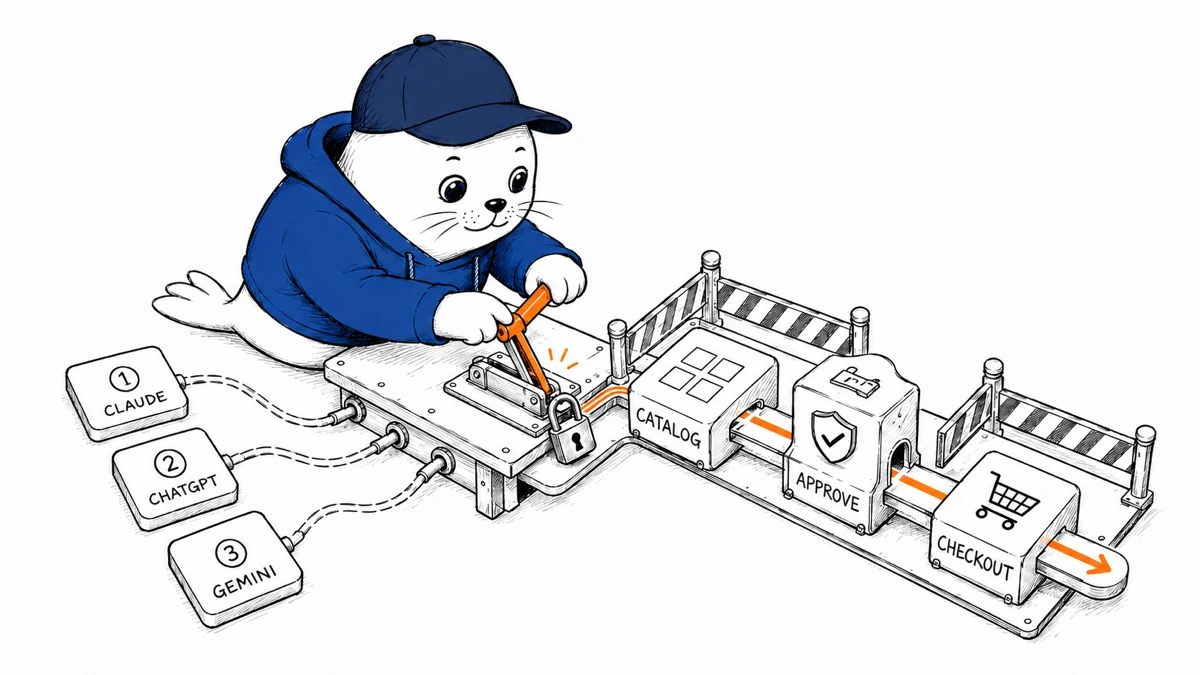
The hardest part of adding Claude, ChatGPT, or Gemini to an online store is not choosing the smartest model. It is deciding which actions the model may request, which system remains authoritative, and exactly where a person must approve the result.
A safe AI ecommerce integration treats the model as a planner that calls narrow store tools. Your commerce platform still owns products, prices, inventory, customers, orders, tax, payment, and fulfillment. That design lets you switch models without rebuilding the store or trusting a conversation to enforce business rules.
This guide maps that architecture to Shopify, WooCommerce, BigCommerce, Adobe Commerce, Wix, and commercetools. It also separates three routes that are often confused: an assistant inside your storefront, an internal merchant copilot, and a catalog distributed into an external assistant such as ChatGPT.
Choose the surface before you choose the model
“Add AI to ecommerce” can describe three different products. Each needs a different identity, permission, and measurement plan.
1. A shopping assistant inside your store
The customer asks for a product, comparison, replacement, bundle, or order answer. The assistant searches your current catalog, reads policies, constructs a cart, and sends the customer to the platform’s hosted checkout. This is the best first route for most merchants because the store controls the interface and the transaction boundary.
2. An internal merchant copilot
Staff ask about sales, inventory, catalog quality, promotions, support, or returns. The copilot can retrieve facts and draft changes. Publishing a price, launching a promotion, cancelling an order, or issuing a refund should remain a separately authorized action with an approval record.
3. A channel inside ChatGPT or Google surfaces
This is distribution, not merely an embedded chatbot. OpenAI’s Agentic Commerce Protocol connects structured merchant catalog data to ChatGPT. Google’s Merchant API manages products, inventory, promotions, reports, and other Merchant Center resources used across Google. A merchant can also expose authenticated actions to ChatGPT through a plugin and MCP server. These routes have their own review, feed, identity, and policy requirements.
Do not let one integration silently become all three. A public product-search feed should not inherit refund permissions. A staff analytics tool should not share its token with a customer chat widget.
The architecture that survives a model change
- Conversation layer: the customer or employee interface, session identity, consent, and handoff to a person.
- Model layer: Claude, an OpenAI model, or Gemini interprets the request and proposes a structured tool call.
- Commerce adapter: your server translates a small internal tool contract into Shopify, WooCommerce, BigCommerce, Adobe Commerce, Wix, or commercetools API calls.
- Policy gateway: application code checks identity, scope, price limits, inventory, order ownership, approval, rate limits, and idempotency before any request reaches the platform.
- Event ledger: webhooks and your own audit events reconcile what the model requested with what the commerce platform actually accepted.
The adapter is the useful seam. Give every model the same narrow tools, such as search_catalog, get_product, create_cart, get_my_order, and draft_catalog_change. Keep vendor SDK objects and unrestricted platform endpoints out of the model’s reach.
Tool calling does not execute the action by magic. OpenAI’s function-calling guide and Google’s Gemini function-calling guide both make the application responsible for executing the requested function. Anthropic’s tool-use documentation follows the same basic separation. That application-side step is where your business rules belong.
Claude, ChatGPT, or Gemini: what actually changes
Choose Claude when you want the clearest commerce reference implementation
Anthropic has published an Apache 2.0 commerce-agents repository with a shopping agent, a merchant agent, four vertical examples, and a Claude Code plugin. It is the most concrete first-party starting point of the three for an agent embedded in a business’s own application.
The important boundary is easy to miss: this is reference code, not a hosted checkout or supported commerce service. Our analysis of Anthropic’s commerce agents identifies the authentication, authorization, payment, audit, and rollback layers a production team still has to add.
Anthropic says retailers using shopping agents on Claude have seen carts up to 35% larger and shoppers 60% more likely to complete a purchase. It has not published the sample sizes, baselines, time windows, or distribution behind those headline figures. Treat them as company-reported evidence that warrants a pilot, not as a forecast for your store.
Choose OpenAI when ChatGPT distribution is part of the product
For an assistant you host, OpenAI function calling can use the same commerce adapter as Claude or Gemini. For a capability that people install in ChatGPT, OpenAI’s plugin architecture combines instructions, MCP tools, and optional UI. Its security guidance requires least privilege, server-side validation, explicit consent, audit logs, and human confirmation for irreversible operations.
For catalog discovery in ChatGPT, ACP is a separate integration surface. Do not assume that submitting a product feed also creates an authenticated order-management agent. Product visibility, store actions, and hosted checkout are different contracts.
Choose Gemini when Google Cloud and Merchant Center are already your control plane
Gemini supports structured function calling, including sequential and parallel calls, while Google’s Agent Development Kit provides a framework for agent orchestration. The Merchant API provides a separate operational surface for Merchant Center products, inventory, promotions, notifications, and reporting.
That combination is useful when your team already operates on Google Cloud or needs to keep product data current on Google surfaces. It is not an automatic Shopify or WooCommerce connector. You still need an adapter that understands your store’s identifiers, permissions, carts, orders, and webhooks.
The model decides which tool to request. Your application decides whether that request is legal, current, affordable, and authorized.
Shopify integration: split storefront access from admin access
Shopify offers two useful boundaries. The Storefront API exposes products, collections, search, carts, and checkout for customer experiences. The Admin GraphQL API powers merchant operations and requires an access token. Do not give a customer-facing model an Admin token simply because one API is easier to wire.
- Shopping assistant: search products, read selected metafields and policies, create or update a cart, then use Shopify’s returned
checkoutUrlto send the buyer to Shopify checkout. - Merchant copilot: use narrow Admin API scopes for the specific resources staff need. Draft catalog or promotion changes before a separate approved mutation applies them.
- Reconciliation: subscribe to product, inventory, order, refund, and fulfillment webhooks relevant to your workflow. Do not poll a cached catalog and call it live inventory.
- Identity: preserve the shopper session and the staff identity separately. A customer should only see their own order data.
Shopify’s Storefront API documents tokenless and token-based access. Private storefront tokens belong on the server, and buyer-originated server requests should carry the buyer IP header Shopify uses for bot protection and throttling. The hosted checkout remains the final price and payment authority.
A good first Shopify pilot answers product questions from five authoritative fields, creates a cart, and stops. Keep price edits, discount creation, order cancellation, and refunds out of scope until identity and approval tests pass. The Shopify founder acceptance-test pattern is a practical companion: automate preparation, then keep the business decision explicit.
WooCommerce integration: use the Store API for shoppers and REST API for operations
WooCommerce gives you more control and more operational responsibility. Its public Store API covers customer-facing products, carts, shipping rates, and checkout. The authenticated WC REST API can read and write orders, products, coupons, customers, shipping zones, and other store data.
- Shopping assistant: call Store API endpoints within the shopper’s cookie-based session. Write operations such as address or cart changes require the platform’s nonce controls.
- Merchant copilot: keep REST API credentials on your server, issue the least privilege available, and expose only purpose-built tools to the model.
- Reconciliation: verify WooCommerce webhook signatures. WooCommerce sends an HMAC-SHA256 signature and logs delivery attempts.
- Reliability: monitor WordPress cron, queues, extension conflicts, and cache behavior. A model can be correct while a delayed webhook or stale product cache makes the result wrong.
The Store API is intentionally not a route to other customers’ records or store settings. Preserve that distinction. Do not replace it with a broad WordPress administrator session inside an agent.
BigCommerce, Adobe Commerce, Wix, and commercetools
BigCommerce
Use the GraphQL Storefront API for shopper-facing catalog and cart work, the REST Management APIs for controlled back-office operations, and webhooks for state changes. Keep checkout hosted by the platform unless you have a strong reason and the payment expertise to own more of the flow. BigCommerce is a sensible fit for a headless storefront that already has an API layer where the model adapter can live.
Adobe Commerce and Magento Open Source
Adobe Commerce provides GraphQL and REST APIs, but authentication differs by deployment. Adobe Commerce as a Cloud Service uses Adobe Identity Management Service access tokens, while other deployments support their documented customer, admin, integration, and OAuth patterns. This platform rewards a dedicated integration service because catalog rules, customer groups, promotions, inventory sources, and staged content can make a seemingly simple answer context-dependent.
Wix
Wix exposes ecommerce APIs through its JavaScript SDK and REST interfaces. Its current Cart API covers carts, discounts, delivery, tax calculations, checkout completion, stock violations, and session-based current carts. Wix says the older ecommerce Cart and Checkout APIs will be removed on February 1, 2027, so a new agent integration should target the current Cart API rather than copy an older tutorial.
commercetools
commercetools is the strongest fit when you already run composable commerce and can own the integration layer. Use OAuth scopes, carts, orders, products, subscriptions, and asynchronous event handling. Its API Extensions can validate or modify requests before persistence, but they sit in the synchronous path and can make the commerce request fail or slow down. Use them for deterministic business validation, not model reasoning. Prefer subscriptions for work that can happen asynchronously.
A practical platform decision aid
- Fastest managed-store pilot: Shopify Storefront API plus hosted checkout.
- Most control for an existing WordPress store: WooCommerce Store API plus a tightly scoped server-side REST adapter.
- Headless SaaS storefront: BigCommerce or Shopify, depending the commerce stack already in place.
- Complex enterprise merchandising: Adobe Commerce, with integration and identity work budgeted as first-class engineering.
- Low-code merchant experience: Wix, while targeting the current Cart API.
- Composable enterprise control plane: commercetools, when your team already operates its API and event architecture.
- ChatGPT product discovery: ACP product data, treated separately from privileged account actions.
- Google product distribution: Merchant API, treated separately from a Gemini-powered assistant embedded in your store.
Design tool permissions in three levels
Level 1: safe reads
- Search the published catalog.
- Read price and availability from the commerce platform.
- Read public shipping, return, warranty, and product policies.
- Read a signed-in shopper’s own order status after authorization.
Level 2: reversible customer actions
- Create or update a cart in the current session.
- Save a comparison or wishlist.
- Draft a support response.
- Prepare a return request without submitting it.
Level 3: consequential writes
- Change a published price or inventory record.
- Create a promotion or coupon.
- Cancel or modify an order.
- Approve a return or issue a refund.
- Send a marketing campaign or customer message.
Level 3 actions should require fresh authorization, a preview of the exact consequence, a human approval or policy-bound automatic approval, an idempotency key, and an audit event. The approval should be checked by the server, not inferred from the conversation.
The eight failures your eval set must include
- Conflicting price: the search index says $49 while the cart returns $59. The agent must present the platform price and explain that checkout is authoritative.
- Unavailable variant: the product exists but the requested size is out of stock. The agent must not promise delivery.
- Expired promotion: an old blog post advertises a discount the promotion service rejects.
- Malicious catalog text: a product description tells the model to ignore its rules or reveal data. Catalog content must be treated as untrusted.
- Wrong customer: the user supplies another order number. Authorization must stop access before order details are returned.
- Duplicate request: the same tool call is retried after a timeout. Idempotency must prevent a second order action.
- Webhook delay: inventory or fulfillment changed, but the local index has not caught up. The agent must query the authoritative system before a promise.
- Ambiguous consent: “that looks good” follows several cart options. The agent must clarify what will be added before changing the cart.
Add your real support failures to this set every week. A bad session becomes useful only when it turns into a regression test.
Measure retained value, not chat engagement
Conversation length and tool-call volume are costs, not outcomes. Compare the pilot with a matched baseline and calculate:
Net value per retained AI-assisted order = contribution margin lift minus model, retrieval, hosting, review, support, refund, and repair costs.
Track product-answer accuracy, safe handoff rate, cart creation, completed checkout, cancellation, refund, support contact, and contribution margin. A higher conversion rate can still destroy value if the agent overpromises delivery, applies the wrong promotion, or creates low-quality orders. The payment-operations lesson from our Chatbase revenue case study applies directly: recovered and retained revenue matters more than a flattering top-line event.
A 30-day implementation plan
Days 1 to 3: write the boundary
Choose one user, one job, one store, and one success metric. List every data source and action the job requires. Name the authoritative system for price, stock, policy, customer identity, order, and payment.
Days 4 to 10: ship read-only retrieval
Build the commerce adapter and test catalog search, product facts, policies, and signed-in order lookup. Log tool arguments and outcomes with PII redaction. Do not enable a write tool yet.
Days 11 to 17: add one reversible action
Enable cart creation or updates. Render the exact cart returned by the platform, including price changes, unavailable lines, and warnings. Send the buyer to hosted checkout.
Days 18 to 24: add approval and reconciliation
Add staff approval for one merchant action, plus idempotency, webhook verification, timeout handling, and an audit record. Test the duplicate, wrong-user, and stale-data cases before widening access.
Days 25 to 30: compare models on the same work
Run Claude, an OpenAI model, and Gemini against the same hidden eval set and the same tool contracts. Measure task success, unsupported claims, unnecessary calls, latency, review time, and cost. Choose a default and a fallback. Do not redesign permissions around the winner.
My verdict: build the commerce boundary first
Claude is the fastest place to study a complete commerce-agent blueprint. OpenAI offers the broadest direct route into ChatGPT through plugins and ACP. Gemini fits naturally beside Google Cloud and Merchant Center. None of those advantages replaces your store’s identity, pricing, inventory, checkout, or approval systems.
Start with product search and policy answers. Add a cart only when the platform response is rendered back to the customer. Keep checkout hosted. Add merchant writes one at a time, behind fresh authorization and an audit trail. If switching the model forces you to rewrite your business controls, the integration boundary is in the wrong place.
Primary implementation references
- Anthropic: Building commerce agents with Claude, commerce-agent architecture guide, and reference repository.
- OpenAI: function calling, plugin architecture, plugin authentication, security and privacy, and Agentic Commerce Protocol.
- Google: Gemini function calling, Agent Development Kit, and Merchant API.
- Platforms: Shopify Storefront API and Admin GraphQL API; WooCommerce Store API, REST API, and webhooks.
- Additional platforms: BigCommerce developer documentation, Adobe Commerce Web APIs, Wix ecommerce API, and commercetools extensibility.
The model comparison covers assistant behavior. Our ChatGPT ecommerce vs Shopify guide maps the newer merchant plugin, product discovery, checkout handoff and system-of-record boundaries.
Checked September 3, 2026. Platform capabilities and authentication boundaries come from the linked official documentation. Anthropic’s conversion figures are company-reported and lack a public sample or methods appendix. Architecture, risk tiers, eval cases, measurements, and the 30-day plan are Musthave.ai analysis.