The prompt that changed how I use ChatGPT was not clever. It was a decent assignment with a goal, source material, a deliverable, boundaries, and a final check.
Searches for how to use ChatGPT effectively are rising again on Google Trends. That usually brings a new wave of giant prompt templates. I think most people need the opposite: a shorter brief, better evidence, and a willingness to correct the first answer.
OpenAI’s own prompting guidance says to be clear and specific, provide context, refine iteratively, and request the tone you need. A recent OpenAI Academy framework for newsroom work turns that into six practical parts: role, task, context, output, limits, and check.
Use ChatGPT like a capable colleague receiving an assignment
A vague request forces the model to invent the missing brief. “Write about email marketing” leaves the audience, purpose, sources, length, opinion, format, and definition of success open. The answer can sound polished while solving a different problem.
A useful assignment can still be short:
You are helping me prepare a 600-word email for freelance designers who have not used AI tools. Use the attached pricing page as the source. Explain the free plan, name two limits, and end with one low-pressure call to action. Keep sentences short. Do not invent features. List any unsupported claim after the draft.
That prompt does not rely on magic words. It gives the model something concrete to complete and something concrete for you to inspect.
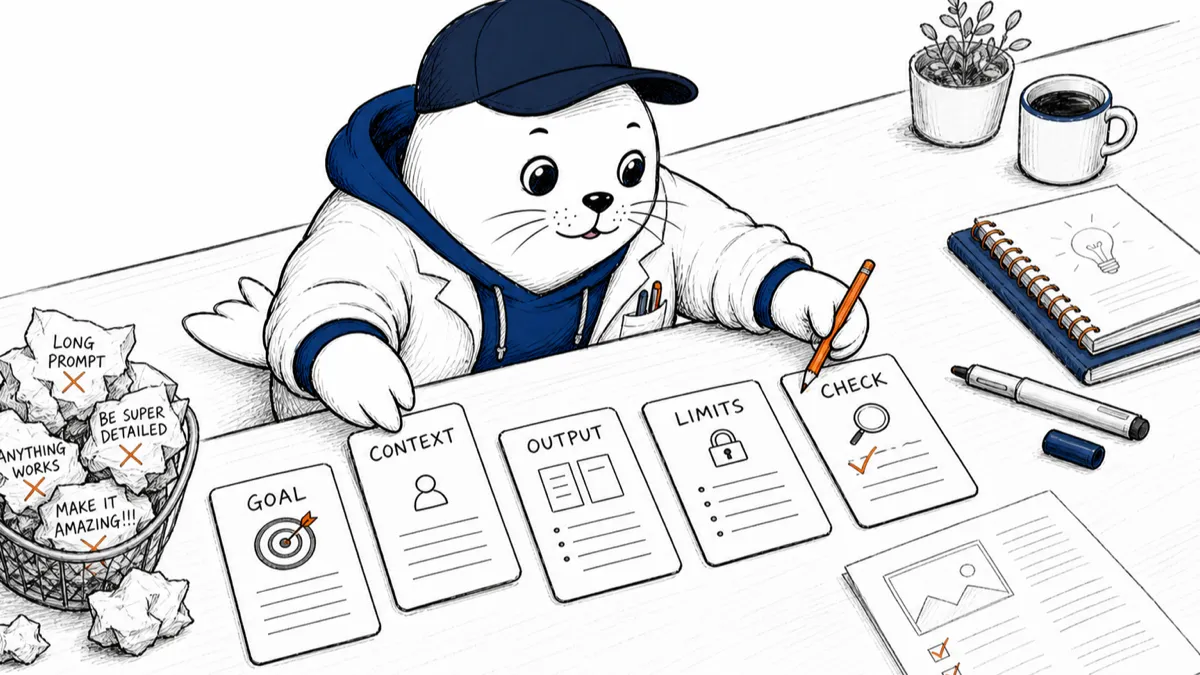
The five-card brief
- For everyday work, these five pieces cover most of what ChatGPT needs.
- GOAL: What must be accomplished?
- CONTEXT: Who, why, and what does it know?
- OUTPUT: What shape should the answer take?
- LIMITS: What must it avoid or preserve?
- CHECK: How will claims be verified?
How to use ChatGPT effectively with real source material
Ask ChatGPT to work from the document, spreadsheet, image, transcript, or notes that actually contain the answer. If the source is long, tell it where to focus and ask for quotations or page references that you can inspect.
Source-grounded work changes the conversation. Instead of “What is our refund policy?” ask, “Using only the attached policy, list the refund windows by product and cite the heading for each one. Mark anything unclear.” You have turned a memory test into a reading task.
This is especially important for prices, regulations, current news, medical details, and company policies. ChatGPT can help you find and organize the evidence; it should not be the evidence.
Stop asking for the final answer in one turn
The most effective workflow is usually two or three passes. Ask for the plan, inspect the assumptions, then request the draft. On factual work, ask for a claim table before asking for prose. On design work, choose the concept before polishing the copy.
Iteration does not mean repeating “make it better.” Tell ChatGPT what failed: the opening is too generic, the examples are aimed at enterprises, two claims lack sources, or the conclusion repeats the introduction.
Weak loop versus useful loop
- Specific feedback creates a new constraint; vague feedback invites another guess.
- Weak: “Make it better”: The model decides what “better” means and may only add polish.
- Weak: “Make it human”: The model may add contractions, anecdotes, or fake personality without improving truth.
- Useful: “Cut the first 80 words”: Remove setup and begin with the reader’s decision.
- Useful: “Flag every unsupported number”: Turn confidence into a checkable editorial task.
Give examples when style actually matters
Adjectives such as “professional,” “friendly,” or “engaging” are broad. A short sample of your real writing tells ChatGPT more about sentence length, rhythm, vocabulary, humor, and how directly you speak to the reader.
Do not ask it to imitate a living writer. Give it your own paragraph or a house-style excerpt, then name the features you want preserved. OpenAI’s Custom Instructions, Projects, and GPTs can hold stable preferences, but a task-specific example is still useful when the deliverable has a distinct voice.
For a deeper editorial workflow, our guide to staying human while creating content with AI covers the review habits that matter after the prompt.
Use the right conversation boundary
Keep one project or thread focused on one continuing job. Start a fresh chat when the goal changes, the old context is steering the model incorrectly, or sensitive material should not travel into the next task.
At work, keep personal and company accounts separate. Review your organization’s data policy before uploading confidential files. A better prompt cannot repair a bad data-handling decision.
Ask ChatGPT to show uncertainty in a useful format
“Are you sure?” often produces a more confident paragraph. Ask for something you can act on instead:
- List the three claims most likely to be wrong.
- Separate facts from recommendations.
- Show which sentence comes from which source.
- State what information is missing.
- Give me a test that could disprove this answer.
That is how to use ChatGPT effectively on serious work: make uncertainty visible before you make the output public.
A 10-minute practice that beats a prompt library
- Choose a task you completed recently and know well.
- Give ChatGPT the goal, context, output, limits, and source.
- Ask for a plan or claim table before the final answer.
- Correct one specific failure and request a second pass.
- Compare the result with your original work and note where checking took longest.
Repeat that practice with writing, a spreadsheet, and a research task. You will learn more about the tool than you would from saving fifty prompts you never use.
My answer to how to use ChatGPT effectively
Give it a job, not a wish. Supply the evidence. Define the shape of the result. State the boundaries that matter. Inspect the first pass and correct a specific failure. Verify important claims outside the chat.
If you want a tour of the wider product, read our practical ChatGPT guide for regular people. If your task is search content, our SEO with AI workflow explains where automation helps and where it creates thin pages.
The best prompt is rarely the longest. It is the one that makes your intent clear and the answer easy to check.
Use OpenAI’s own guidance
- Read OpenAI’s prompting best practices for ChatGPT.
- Work through the ChatGPT fundamentals guide.
- Watch OpenAI Academy’s role, task, context, output, limits, and check framework.
What is one task where ChatGPT gives you a polished answer that still misses the point? Tell me the task in the comments.
Research note: I checked OpenAI Help Center and OpenAI Academy prompting guidance plus the related Google Trends query on August 3, 2026. Product features and account controls can change; the working method here is deliberately model-agnostic.