ChatGPT Images 2.5 is rolling out with faster generation, tighter edits and a more complete creation workflow. The headline improvement is not just image quality. OpenAI is trying to make the image generator usable for repeated, controlled production work.
OpenAI launched ChatGPT Images 2.5 on September 8, 2026. The company says generation latency is up to 50% lower than Images 2.0 and that the model better preserves reference subjects and unchanged details across edits. Those performance statements are OpenAI claims, not independent Musthave.ai benchmark results.
What launched in ChatGPT Images 2.5
| Release | What it does | Where it matters |
|---|---|---|
| Image model update | Sharper detail, more precise editing, improved layouts and richer lighting and textures | Reference-led work, infographics, product imagery and iterative design |
| Sketch | Turns a rough drawing plus written instructions into an image | Layout, composition and shape are easier to communicate than with text alone |
| Templates | Starts from formats such as posters, merch and product photos | Reduces blank-page prompting for common deliverables |
| Image comments | Places feedback directly on an image for a focused edit | Connects review and revision inside the same workflow |
| Prompt sharing | Lets another person reuse an image prompt with their own details | Makes a successful recipe easier to distribute |
The model is rolling out across all ChatGPT tiers, ChatGPT Work and Codex on desktop, mobile and web. The feature details are less uniform. OpenAI’s current help page documents Sketch in the mobile app and says Templates are not yet available in Work mode. It also confirms arbitrary aspect ratios and transparent-background generation.
Flare vs Sunburst: which API model should you use?
| API model | OpenAI’s positioning | Best first use |
|---|---|---|
gpt-image-2.5-flare | Default choice for most apps, with higher quality than GPT-Image-2 at 50% lower latency | High-volume generation, product experiences, visual search, rapid prototypes and social content |
gpt-image-2.5-sunburst | Extra precision for detailed work, with longer generation times | Final campaign creative, polished product imagery and edits where small drift is expensive |
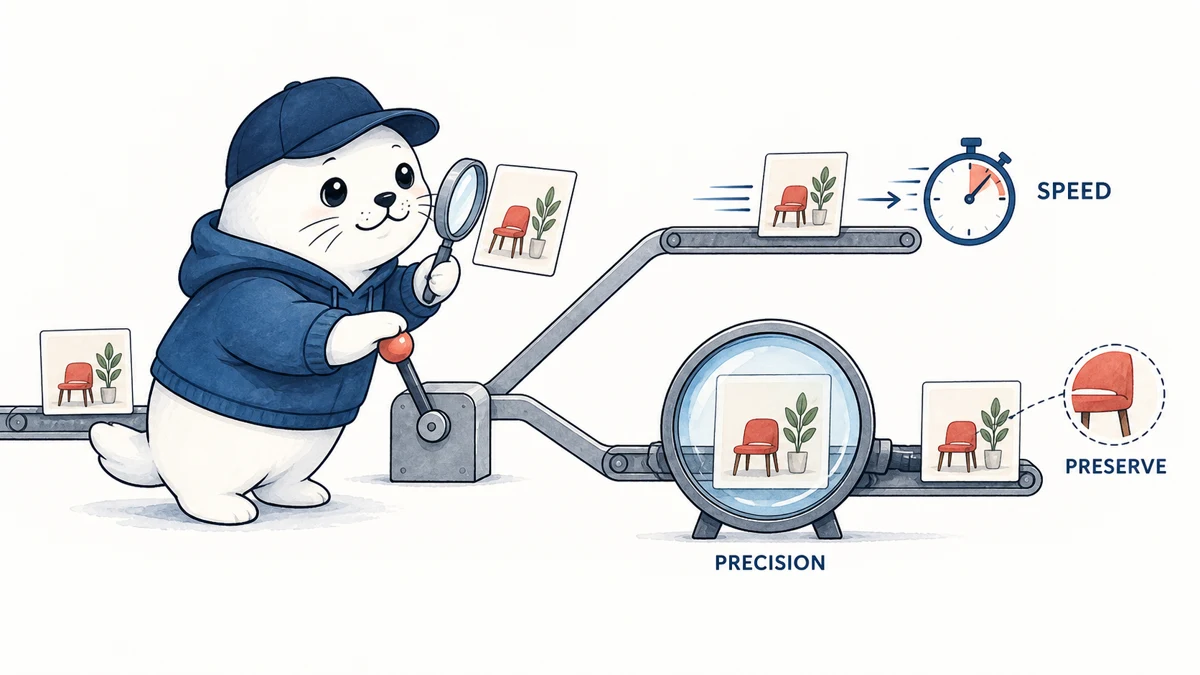
The important distinction is workflow, not a simple good-versus-better ladder. Start with Flare for interactive products and iteration. Reserve Sunburst for the final pass when visual precision is valuable enough to justify waiting longer. A production system can route drafts to Flare and only send approved candidates to Sunburst.
API pricing is double GPT-Image-2’s listed rates
OpenAI’s API pricing page lists the same token rates for Flare and Sunburst. The 2.5 models cost twice as much as GPT-Image-2 in every listed image and text token column. This does not automatically mean every finished asset costs twice as much because output size, retries and iteration count also determine the bill.
| Model | Image input | Cached image input | Image output | Text input |
|---|---|---|---|---|
| GPT-Image-2.5 Flare | $8.00 | $2.00 | $30.00 | $5.00 |
| GPT-Image-2.5 Sunburst | $8.00 | $2.00 | $30.00 | $5.00 |
| GPT-Image-2 | $4.00 | $1.00 | $15.00 | $2.50 |
The useful cost metric is dollars per accepted asset, not dollars per generation. If stronger edit preservation eliminates a full regeneration or several repair attempts, the higher token price can still reduce the cost of approval. Teams should log every generation, edit, retry and rejected output.
The editing claim has a documented limit
OpenAI says Images 2.5 is better at changing only the requested element while preserving subjects, composition and brand treatment. That is the right target for catalog variations, campaign localization and ongoing character work. It is still not a pixel-locked editor.
The Help Center warns that highlights are not always precise and edits may extend beyond the selected area. Keep the source asset, compare every revision against it and inspect faces, logos, small text, hands, product geometry and background objects. Our AI image consistency guide explains why usable text and stable product details matter more than an attractive first impression.
A 20-minute test for speed, precision and cost
- Create one reference image with a person or product, three small objects, visible text and a defined color palette.
- Run four isolated edits: replace one object, change one line of text, alter the background and change lighting.
- Repeat the sequence as a multi-turn conversation to see whether earlier changes survive.
- Use the same prompt, input and output settings with Flare and Sunburst.
- Record wall time, token cost, retries, unintended changes and whether a reviewer accepts the final asset.
Do not score only beauty. Count preserved requirements. For example: face identity unchanged, chair unchanged, label exact, logo geometry unchanged, target object replaced and background changed. A simple pass count exposes whether precision is improving the workflow or only the demo.
If you are choosing a broader creative stack, compare this test with our Midjourney versus Ideogram workflow guide. Different tools can win at exploration, typography, editing or production handoff.
Launch-day errors are a separate operational warning
OpenAI reported elevated image-generation errors affecting ChatGPT and the Images API on September 8. The company applied a mitigation at 7:11 PM PDT and was monitoring recovery when this article was checked. OpenAI did not say the release caused the incident, so the timing should not be treated as proof of causation.
For developers, the practical response is routine: add retries with backoff, preserve job IDs, expose a failed-generation state and avoid promising instant completion. A faster median generation time does not replace reliability engineering.
September 9 update: OpenAI marked the launch-day incident resolved
Update token: chatgpt-images-25-incident-resolved-20260909. OpenAI’s status record shows that elevated image-generation errors affected both ChatGPT and the Images API on September 8, 2026. The incident is now resolved.
| Status update | Time shown by OpenAI | What it established |
|---|---|---|
| Investigating | 2:32 PM | OpenAI acknowledged elevated image-generation errors |
| Identified | 4:35 PM | The issue had been identified and mitigation work was underway |
| Monitoring | 7:11 PM | A mitigation had been applied and recovery was being observed |
| Resolved | 9:59 PM | OpenAI reported that all impacted services had recovered |
This timeline changes the launch review in one precise way: the availability warning is no longer open. It does not change the documented model features, price table, or image-editing limits discussed elsewhere in this article.
For production use, keep retry limits and a fallback path. A resolved incident is evidence of recovery, not a guarantee of uninterrupted future service. Track accepted outputs, API errors, latency, retries, and the moment a task moved to another model.
Primary source: OpenAI’s ChatGPT and Images API incident record. Checked September 9, 2026.
Safety and provenance get more important as realism improves
The ChatGPT Images 2.5 system card says greater realism can enable more convincing deepfakes without safeguards. OpenAI describes prompt checks, input-image checks, a safety reasoning monitor and output checks. It also says generated images continue to receive C2PA metadata and invisible SynthID watermarking.
Provenance is useful, but it is not a substitute for consent, source records or human review. Metadata can be removed during common export and reposting workflows. Teams working with people, news events or product claims should retain the original prompt, reference rights, output file and approval record.
My take: the release should be judged on revision yield
ChatGPT Images 2.5 looks most consequential where image generators have been weakest: revising an asset without damaging everything around the requested change. Sketch, comments and templates make that capability easier to reach, while Flare and Sunburst turn speed and precision into an explicit API decision.
The tradeoff is clear. API token rates doubled against GPT-Image-2, selection edits can still spill outside the mask and launch-day availability was imperfect. The release earns a production upgrade only if it increases accepted assets per dollar and reduces manual repair. Run the preservation test before moving a live catalog or campaign workflow.
Primary sources
- OpenAI launch announcement
- OpenAI Help Center guide to Images in ChatGPT
- OpenAI API pricing
- ChatGPT Images 2.5 system card
- OpenAI image-generation incident
Checked September 8, 2026. Product and pricing facts are from OpenAI. Quality, speed and usage-scale statements are attributed company claims. The testing method and editorial verdict are Musthave.ai analysis.