cPanel Meridian AI features now cover much more than support chat. In the new goal-based interface, account owners can ask a context-aware assistant for help, generate a website with Sitejet, deploy a Node.js application from Git, a file or an AI agent, and connect development tools through the Model Context Protocol (MCP).
This guide explains what each feature does, how the pieces fit together, what your hosting provider must enable, and where human approval still matters. It is based on cPanel’s current Meridian documentation and release notes, last checked on September 18, 2026. The four interface images are product screenshots supplied to MustHave.ai.
The short version: Meridian is becoming a task-oriented hosting control plane. The built-in assistant helps users understand and safely operate an account, Sitejet turns a business description into a site, AI App Hosting turns source code into a running HTTPS application, and WebPros MCP gives compatible AI agents a controlled route into cPanel.
What is new in cPanel Meridian?
Meridian is cPanel’s goal-based interface introduced with cPanel & WHM version 138. Instead of presenting a large grid of tools, it organizes work into purpose-built hubs for Websites, Email, Files, Databases, Security and Performance. Its Dashboard can surface required actions, account status and suggested next steps. A Command Palette offers direct navigation, and Guided Setup combines domain, website and email configuration.
| Capability | What the user provides | What Meridian does | Main control |
|---|---|---|---|
| AI Assistant | A question, diagnosis request or approved task | Uses account context to explain, guide, inspect and sometimes act | Approval card before account changes |
| Sitejet Builder | A business description, template choice or existing public site | Generates layouts, copy, images and site sections | User edits and publishes the final site |
| AI App Hosting | A Git repository, uploaded archive or MCP-directed project | Builds, installs and runs a Node.js application over HTTPS | Deployment settings, logs, restart and redeploy controls |
| WebPros MCP | A linked WebPros account and MCP configuration | Connects a compatible AI client to approved cPanel capabilities | Authentication, tool permissions and account unlinking |
The availability caveat is important. cPanel says the AI Assistant, Sitejet and Node.js options only appear when the hosting provider enables them and the account’s plan includes them. A screenshot or documentation page does not guarantee that every cPanel customer already has the same menu.
1. How the Meridian AI Assistant works
The AI Assistant opens from the Ask AI control at the bottom-right of Meridian. It is context-aware: it can use the hub currently open, the selected domain and information available inside the signed-in cPanel account. It also keeps conversational context until the user clears the conversation.
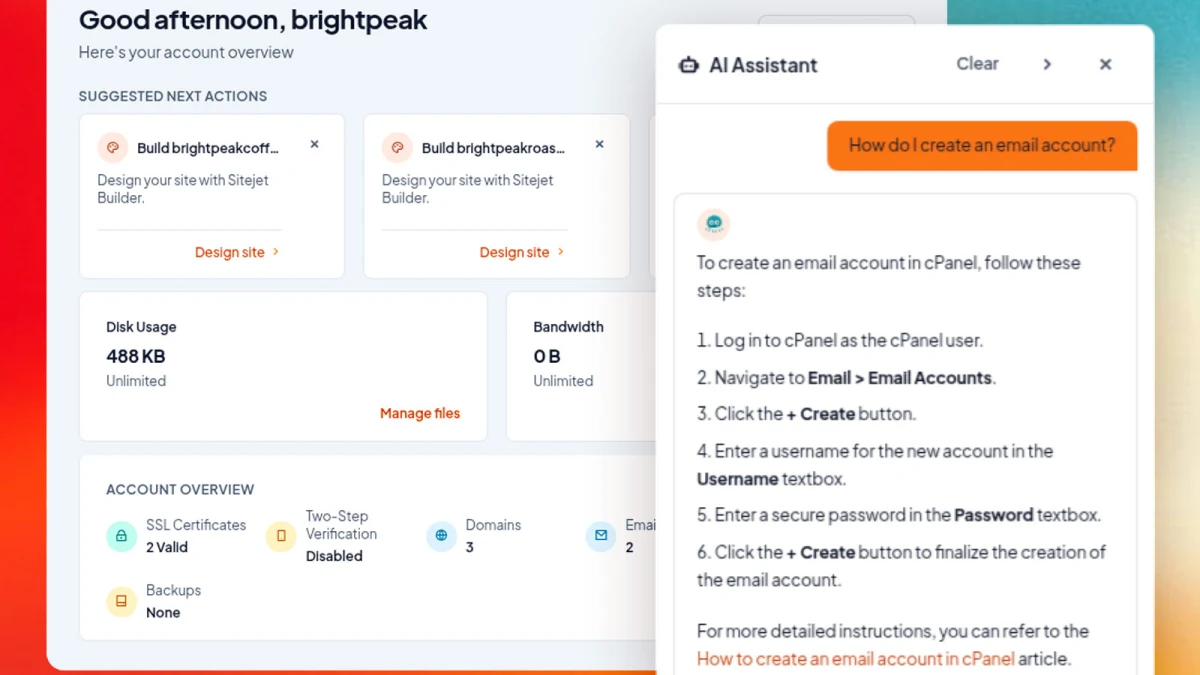
cPanel groups assistant requests into four practical categories:
- Explain: clarify a hosting concept or identify what a setting means.
- Guide: provide step-by-step instructions for a task.
- Diagnose: inspect available account data and help narrow down a problem.
- Act: complete an enabled, low-risk operation after the user approves it.
The assistant can read details such as domains, disk quota, email and FTP accounts, databases, SSL status and the AutoSSL error log. Suggested prompts change as the user moves between the Dashboard, Email, Databases and Websites hubs. That matters because a question like “Why is this domain not secure?” can be grounded in the selected domain instead of becoming a generic hosting answer.
The approval boundary is the most important feature
By default, the assistant answers questions and performs read-only lookups. If a hosting provider enables actions, the assistant may complete certain low-risk tasks, such as creating an email account. Before any change, Meridian presents an Approval required card that describes the planned work. The user can approve it or deny it and receive manual instructions instead.
For a multi-step plan, cPanel says the assistant can request approval once for the described sequence, then show a record of what changed. This is more useful than a vague “AI can manage hosting” claim because it defines the trust model: the assistant can inspect first, propose second and change only after explicit consent.
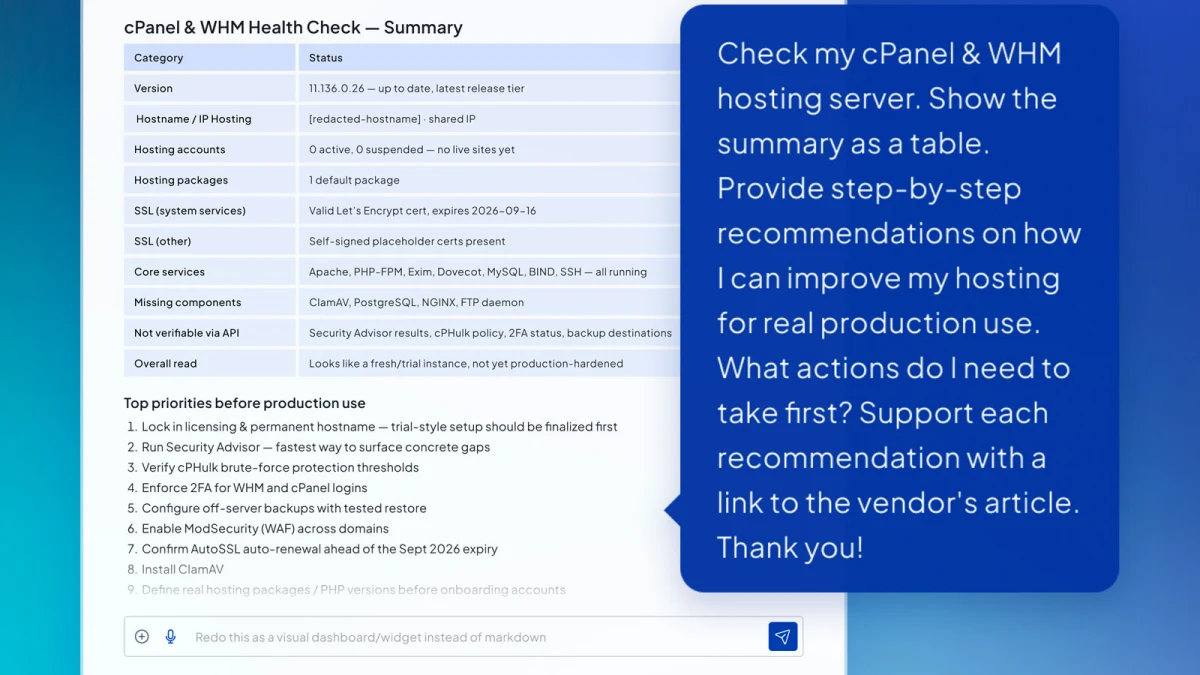
The distinction in that caption is essential. cPanel explicitly says the built-in Meridian assistant is scoped to the current cPanel user’s account. It cannot see or change other accounts or server-level settings, it is not a WHM administrator assistant, and it is not intended to replace hosting support for complex outages or security cleanup. A server-wide health-check workflow may require a separate authenticated agent, API surface or administrator tool.
Good prompts for the built-in assistant
- “Check the SSL status for the selected domain and explain anything that needs attention.”
- “Show which email accounts exist for this domain and guide me through creating another one.”
- “Explain why AutoSSL failed, using the latest error log, but do not change anything.”
- “List the databases in this account and tell me which interface I should use to add a user.”
- “Create the proposed email account only after showing me the exact address and quota for approval.”
For high-risk work, keep the request read-only and ask for a diagnosis, evidence and manual steps. If the assistant proposes an action, verify the target domain, account name, quota and expected result before approving.
2. Build a website with Sitejet AI in Meridian
Sitejet Builder is integrated into the Websites hub. A user can start from a template library or use the AI Website Generator to turn a business description into an initial website. cPanel describes the templates as mobile-ready, SEO-friendly and customizable, while the generator can propose layouts, copy, images and site structure.
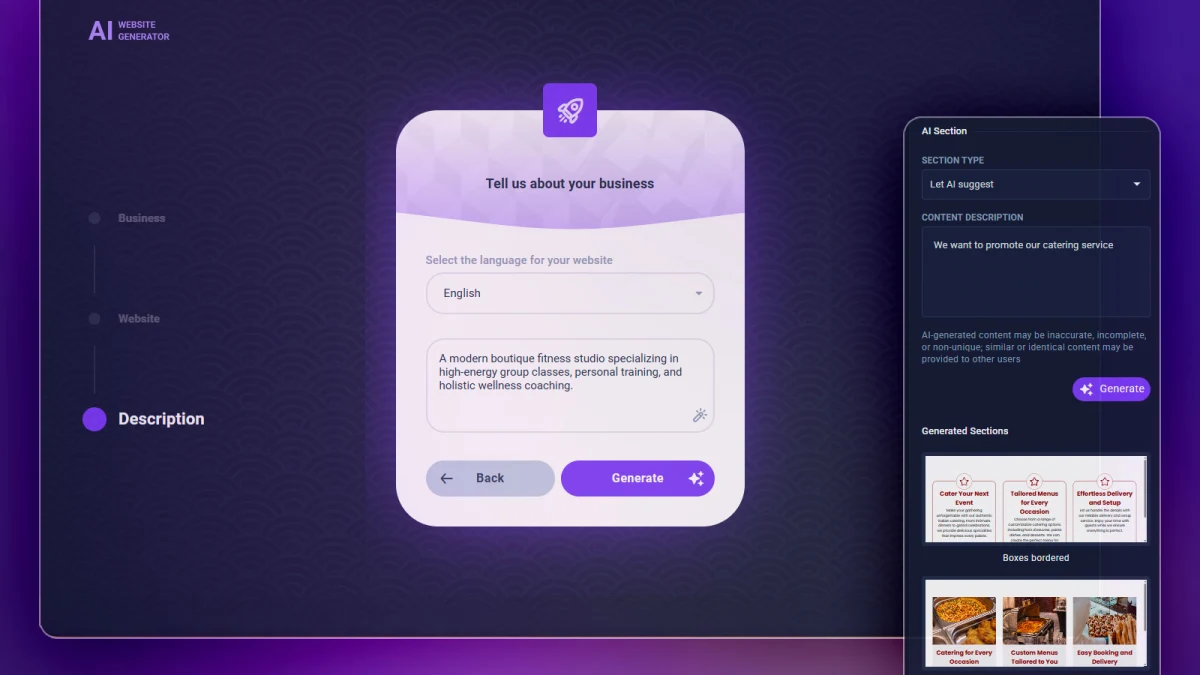
Start a new Sitejet website
- Open the Websites hub and select Add a Website.
- Choose the domain to use, or add a new domain if the account allows it.
- Select Sitejet Builder. On a first website, Meridian may also show a suggested design action on the Dashboard.
- Choose a template or the AI Website Generator.
- Describe the business, audience, location, offer and desired tone in concrete language.
- Review the generated structure and edit every important claim, image, link and call to action.
- Publish only after testing the site on mobile and desktop.
For an existing domain, cPanel also documents a Manage route followed by Build with Sitejet. Sitejet can import publicly available content from an existing website and recreate it inside the builder. That can accelerate a redesign, but it should not be treated as a perfect migration of forms, analytics, structured data, private assets, server-side logic or third-party integrations.
A prompt framework that produces a better first draft
Instead of writing “make a website for my company,” include five pieces of information:
- Business: what the company does and where it operates.
- Audience: who is choosing the service and what problem they need solved.
- Offer: the main services, products or packages to emphasize.
- Proof: credentials, guarantees, response times, case studies or verified reviews.
- Action: whether the visitor should call, request a quote, book, buy or visit.
Example: “Create a bilingual English and French website for a Casablanca catering company serving corporate events and weddings. Emphasize custom menus, halal options, transparent package pricing and delivery across Greater Casablanca. Use a warm, premium tone. The main action should be requesting a quote. Do not invent awards, clients or testimonials.”
What to fix before publishing an AI-generated site
- Replace invented or generic claims with verifiable facts.
- Confirm business name, address, phone, service area, prices and opening hours.
- Use original or licensed images and write descriptive alt text.
- Create a unique page title, meta description and one clear heading structure for each important page.
- Check navigation, contact forms, conversion tracking, privacy notices and cookie behavior.
- Test keyboard navigation, color contrast, form labels and text zoom.
- Compress large images and check Core Web Vitals before promoting the site.
- Verify canonical URLs, redirects and any structured data after a redesign or import.
This is where SEO value is won or lost. A generator can create a fast structural draft, but rankings depend on whether the finished pages satisfy a real search need with accurate, original and useful information. Publishing dozens of near-identical service pages with swapped place names is not a sustainable search strategy.
3. Deploy a Node.js app with AI App Hosting
Meridian’s AI App Hosting flow takes an existing Node.js project, builds it, installs it on a new or existing domain, serves it over HTTPS and keeps the application process running. cPanel says the feature arrives through the Websites hub when the hosting provider enables it. Each cPanel account can host up to four apps at a time.
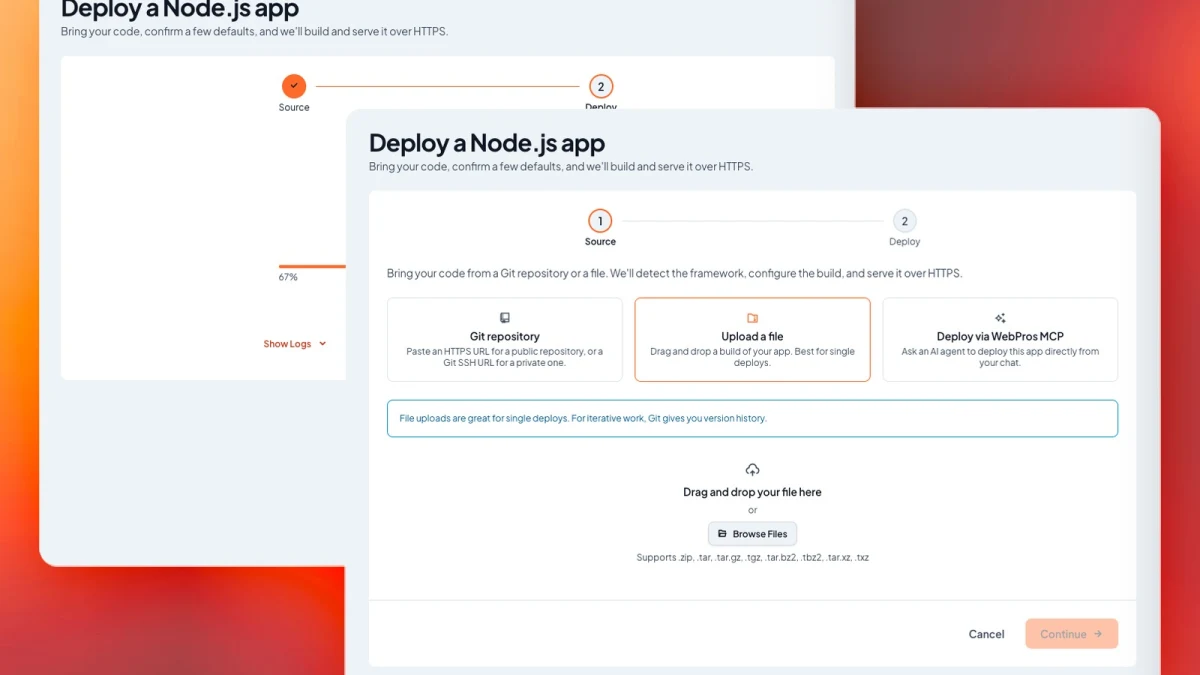
Choose the right source: Git, archive or MCP
| Source | Best for | Main advantage | Tradeoff |
|---|---|---|---|
| Public or private Git repository | Applications that will change over time | Version history, redeploy and rollback path | Private repositories require SSH key access |
| Uploaded archive | A one-time or rarely changed deployment | Simple local upload | No automatic source history or clean collaboration flow |
| WebPros MCP | Agent-assisted deployment from a development client | The agent can coordinate deployment from the project context | Requires account linking, MCP configuration and careful permission review |
cPanel’s documentation calls the file route an uploaded ZIP workflow, while the supplied interface image shows several accepted archive formats. Treat the live interface in your account as the final source of truth for allowed files because provider builds and plugin versions can differ.
Step-by-step Node.js deployment
- Open Websites and click Add Website.
- Select an existing domain or add a new one. On an existing domain, the old files remain on disk, but the application becomes the served content. A newly created domain cannot be renamed after deployment.
- Select AI App Hosting, continue and choose Launch My Website.
- Choose Git repository, file upload or WebPros MCP.
- For Git, use an HTTPS clone URL for a public repository or an SSH clone URL for a private repository. Grant the selected SSH key access as a deploy key. A passphrase may need to be entered again during redeployment.
- Confirm the website name. Under Advanced, review the Node.js version, detected package manager and build output directory.
- Add only the runtime environment variables the application needs. Do not include secrets in the repository.
- Click Deploy. Meridian installs dependencies, builds the project, deploys it and starts the application.
- Open the live HTTPS URL, test a health route and inspect logs before sending production traffic.
One failure deserves special attention: a build can succeed while producing no directory for Meridian to serve. Current cPanel documentation says the deployment then fails and identifies the missing output directory. If a framework writes to dist, build, .next or another location, make sure the detected value matches the project’s actual build command.
Manage the app after deployment
From the website’s Manage view, Meridian can start, stop or restart server applications and redeploy from source. Static applications show redeploy rather than process controls. The App Logs tab shows recent output and can download it; cPanel documents deployment log files under ~/.cpanel/logs/.
The App Env tab can add, edit and remove environment variables. Bulk Edit replaces the complete variable set, so copy the current values before changing them. Variable names must begin with a letter or underscore, and Meridian reserves PORT for the application process. If Git tracks the app’s .env file, the interface does not manage those variables. Current AI App Hosting release notes also say application variables are stored in the app’s own .env file rather than shared container configuration.
Deleting an app is destructive: it stops the process and removes the application and its environment variables. cPanel warns that the operation cannot be undone and may also remove a domain that contains only the app files. Keep a tested Git revision, exported environment inventory and database backup outside the deployment before deleting anything.
4. Connect Claude Code or another AI client through WebPros MCP
MCP is an open protocol that lets an AI application discover and call external tools through a defined connection. Meridian uses a WebPros MCP server so a compatible client can work with cPanel tasks without asking the user to paste raw API tokens into every prompt.
To configure the connection, cPanel documents this path:
- Open Account Preferences and find MCP Connection.
- Select Link WebPros Account and sign in.
- Download
mcp.jsonor copy the connection configuration. - For single-user Claude Code access, place the configuration in the
mcpServerssection of~/.claude.json. - For a shared project connection, use
.mcp.jsonin the repository root. - Restart Claude Code, run
/mcp, choose the authentication option and complete the browser flow.
A repository-level MCP file is convenient for teams, but it also becomes part of project governance. Review the file before committing it, avoid storing credentials in source control, and confirm that every collaborator should see the server definition. Authentication data should remain in the client or secure credential store, not in a pasted prompt.
cPanel’s deployment example: “Using the webpros-mcp connector, deploy the Node.js app in this project to my cPanel account and give me the live HTTPS URL once it’s reachable.”
A stronger production prompt adds constraints: identify the target account and domain, show the detected build command and output directory, list required environment variable names without exposing their values, request confirmation before replacing served content, deploy, then return the URL and relevant log location.
To revoke the connection, use Unlink WebPros Account. cPanel notes that reconnecting later requires a new WebPros login. Revocation should be part of offboarding, incident response and periodic access reviews, not only a troubleshooting step.
How the four cPanel Meridian AI features fit together
The features make the most sense as a progression rather than four unrelated launches:
- Ask: use the assistant to understand the account, selected domain and configuration.
- Build: use Sitejet for a content-led business site, or develop a custom Node.js application when the project needs application logic.
- Deploy: let Meridian detect, build and serve the Node.js project over HTTPS.
- Connect: use MCP when an AI development client needs to coordinate an authorized deployment.
- Approve and verify: keep account changes, domain switching and production release decisions under human control.
This model resembles the permission boundary in WebMCP site tools: useful agents need both capability and a visible consent layer. Teams evaluating a broader agent stack can also compare the authentication model with AWS AgentCore MCP apps for ChatGPT and Claude. For self-hosted development infrastructure, our self-hosted coding-agent security checklist covers isolation, secrets and rollback in more depth.
Which workflow should you choose?
| Your goal | Best starting point | Why |
|---|---|---|
| Understand a domain, SSL issue or account setting | AI Assistant in read-only mode | It can use current account context without changing anything |
| Launch a brochure, local business or campaign site quickly | Sitejet AI Website Generator | Fast layout and content draft with visual editing |
| Move an existing Node.js project into cPanel | Git-based AI App Hosting | Best versioning, collaboration and rollback path |
| Deploy a one-off static Node.js build | Archive upload | Simple when no ongoing source workflow is required |
| Let a coding agent coordinate deployment | WebPros MCP plus Git | Project-aware automation with a connection that can be revoked |
| Administer multiple cPanel accounts or WHM server policy | WHM and provider-approved admin tooling | The built-in Meridian assistant is not a WHM administrator |
Production and security checklist
- Confirm the hosting provider has enabled each feature and identify the installed Meridian and AI App Hosting versions.
- Use the assistant in read-only mode until the proposed action and target are clear.
- Review every approval card. Do not approve a plan that names the wrong domain, account or resource.
- Keep Git as the source of truth for applications that will change.
- Do not commit production secrets, deploy-key private material or authenticated MCP state.
- Use separate credentials and environments for development, staging and production where the plan supports them.
- Verify the build command, output directory, runtime version, package manager and startup command.
- Test HTTPS, redirects, health checks, forms and error pages after deployment.
- Download logs and preserve the last known-good revision before a risky redeploy.
- Back up databases and user content separately from the application bundle.
- Review generated Sitejet copy for accuracy, originality, accessibility and legal compliance.
- Unlink WebPros MCP access when a project ends, a collaborator leaves or a credential is suspected to be compromised.
What Meridian still does not replace
Meridian reduces setup friction, but it does not eliminate hosting expertise. The assistant is not a substitute for an incident responder, a security audit or a provider’s support team. Sitejet does not verify every claim or guarantee unique content. AI App Hosting does not create application tests, database migrations or a rollback policy. MCP does not make an agent trustworthy by itself.
The new layer is best understood as guided orchestration. It can shorten the path from intent to action, but the account owner still owns the domain, data, permissions, deployment decision and final verification.
MustHave.ai verdict
The most consequential cPanel Meridian AI feature is not any single generator. It is the attempt to put help, creation, deployment and agent connectivity inside one governed workflow. The AI Assistant introduces account-aware guidance and an approval boundary. Sitejet serves users who need a visual website. AI App Hosting serves developers with an actual Node.js project. WebPros MCP connects that hosting layer to modern coding agents.
For beginners, this can make cPanel less intimidating. For experienced operators, the value will depend on provider support, transparent logs, reliable versioning and permission design. Start with read-only inspection, choose Git for repeatable deployments, keep secrets outside source control, and treat every AI-generated result as a draft or proposed action until a human verifies it.