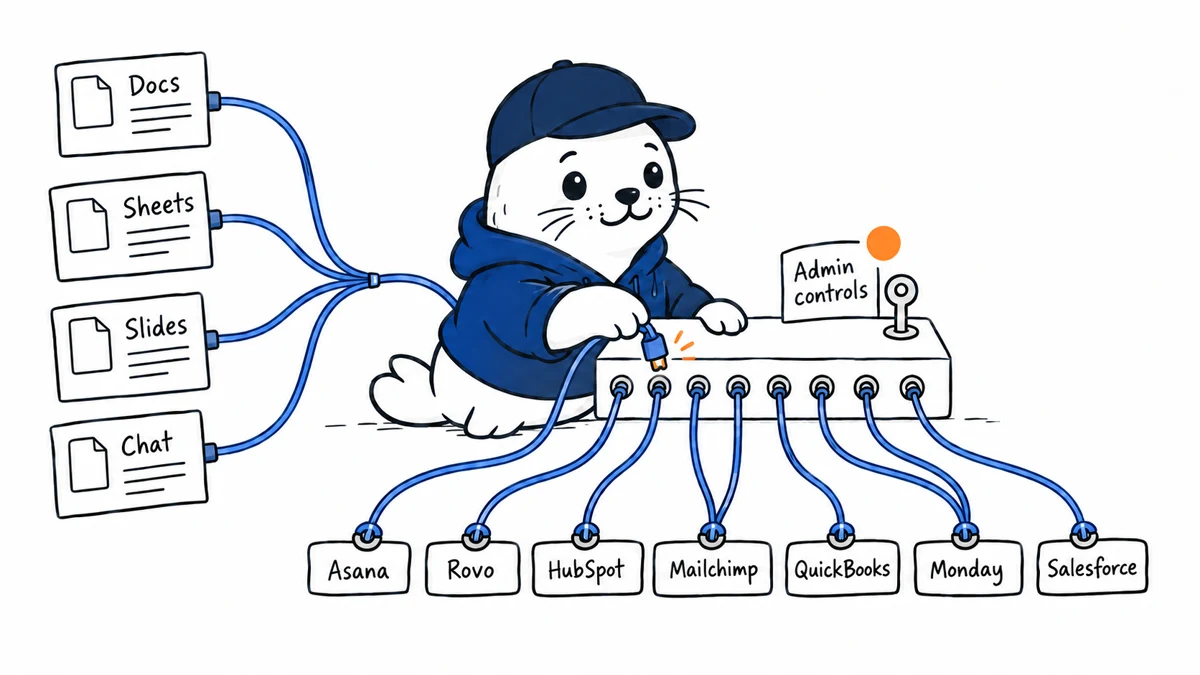
Gemini in Google Workspace now connects to Asana, Atlassian Rovo, HubSpot, Mailchimp, QuickBooks, Monday and Salesforce through MCP. The useful news is not just the connector count. It is that the same connections can operate inside Docs, Sheets, Slides and Google Chat under administrator control.
Seven connectors, four work surfaces
| Connected service | Typical question | Control to verify |
|---|---|---|
| Asana | Which project tasks are blocked? | Project membership and private tasks |
| Atlassian Rovo | What does the internal knowledge base say? | Source permissions and citation scope |
| HubSpot | Which leads changed this week? | Contact fields and export rights |
| Mailchimp | How did the latest campaign perform? | Audience access and marketing consent |
| QuickBooks | Which invoices remain unpaid? | Financial role and sensitive fields |
| Monday | Which work items need an owner? | Board and workspace boundaries |
| Salesforce | What changed in the pipeline? | Object, record and field permissions |
Where Gemini Workspace MCP is available
Google says the connections are available in Docs, Sheets, Slides and Google Chat for listed Business, Enterprise, consumer and education editions that include Gemini in Workspace. The feature is enabled by default for eligible users, while administrators can manage availability at the domain, organizational-unit or group level and control individual connectors.
MCP does not erase the permission model
A connector can make a tool easier to reach without making every record appropriate for every prompt. The important security question is which identity the connector uses and whether it preserves the source system’s row, object and field permissions. A useful deployment begins with two test users who have different access and asks the same question from the same Workspace surface.
- Confirm what data can be read, created or changed.
- Separate read-only discovery from write operations.
- Check whether citations identify the source record.
- Review logs for the user, connector, action and result.
- Test revocation after an employee changes roles.
The workflow advantage is context, not another chat window
The strongest pattern is assembling a work artifact where the user already operates. A sales manager can draft a plan in Docs with current Salesforce context, a finance lead can examine QuickBooks data in Sheets, and a project team can turn Asana status into a presentation. The value comes from shortening the distance between evidence and the document that records a decision.
A practical rollout matrix
| Phase | Connector scope | Success measure |
|---|---|---|
| Pilot | One read-only connector, one group | Correct answers with traceable sources |
| Expansion | Two related systems | Less manual copying without permission leakage |
| Write access | One reversible action | Clear confirmation, audit and rollback |
| Production | Approved portfolio | Usage, error and revocation evidence |
How it compares with other agent platforms
Google’s move follows a broader shift toward governed tool connections. Our coverage of Google agent search add-ons shows the retrieval side, while AWS AgentCore and MCP apps covers a separate deployment model. The common buying question is not whether MCP exists, but how identity, consent and logs travel through it.
The verdict for Workspace administrators
Gemini Workspace MCP can reduce context switching across seven widely used business systems. Administrators should resist enabling every connector simply because it is available. Start with a bounded read workflow, test two permission levels, measure answer traceability and expand only when connector logs and revocation behave as expected.
Primary source
Checked September 16, 2026. Availability and administration details are based on Google’s rollout notice. Connector behavior can differ by service and account.